Install Knotis
[[Required tools]]
- [[Terminal]].
- Recommended: Warp
- A plain-text editor.
- Recommended: VS Code with
- Knotis VS Code extension (A live preview and Knotis-compatible Markdown editing commands).
- Recommended: VS Code with
- A hosting service for publishing the site.
- Recommended: [[GitHub]] Pages.
- Sign up at GitHub.com.
- Recommended: [[GitHub]] Pages.
[[Knotis installation]]
- Prerequisite: Install Python 3.11+ from python.org.
-
Then, run the following codes in [[terminal]].
-
Create a [[site folder]]
- Choose where the course site should live on your computer and create an empty folder for it.
-
Create the site folder manually, or run the following in [[terminal]]:
[[Scaffold]] the site
-
Run the following in the site folder
cd /path/to/my-site-folderin [[terminal]]:-
- The
.means “scaffold the site here,” in the current folder,/path/to/my-site-folder.
- The
-
What [[scaffold|scaffolding]] creates
knotis newsets up and builds a working site automatically.- You do not create
zensical.tomlor the folder layout manually at this stage.- It initializes the site tree and then copies the packaged scaffold into it.
- You do not create
-
After the command finishes, the folder contains:
-
my-site-folder/
├── docs/
│   ├── index.md                    starter home page
│   ├── section-1/
│   │   └── page-1.md … page-5.md   sample pages (section-1 tag)
│   ├── section-2/
│   │   └── page-6.md … page-10.md  sample pages (section-2 tag)
│   ├── explore/
│   │   ├── content-tags.md         content tags landing page
│   │   ├── glossary.md             glossary landing page
│   │   └── site-graph.md           site graph landing page
│   ├── assets/                     build output (JSON + mirrored runtime assets)
│   │   └── attachments/
│   │       ├── section-1/
│   │       │   └── page-1/ … page-5/   sample per-page attachment folders
│   │       └── section-2/
│   │           └── page-6/ … page-10/  sample per-page attachment folders
│   └── javascripts/
│       └── glossary.js             glossary view toggle helper
├── assets/                         site theme overrides
├── overrides/                      HTML templates and theme hooks
├── site/                           built HTML (generated on initial build)
├── zensical.toml                   site name, navigation, and settings
-
-
[[docs folder|docs]]/: contains the site’s Markdown pages.
- The scaffold starts with section folders such as
section-1/,section-2/, andexplore/.
- The scaffold starts with section folders such as
- docs/[[assets|assets folder]]/: stores files used by pages, such as images, datasets, PDFs, downloads, and other media.
- The scaffold creates one attachment folder per sample page so page-specific files have a clear home.
- [[overrides folder|overrides]]/: contains optional theme and template overrides.
- The scaffold includes starter templates such as header controls and per-page layout options.
- [[zensical.toml]]: the main site configuration file.
- Controls the site name, navigation, theme settings, and Knotis/Zensical behavior.
- Ships with working defaults so the site can build before customization.
[[Serve]] and [[build]] the site locally
- Build the site and start a local server.
-
Run the following in the site folder
cd /path/to/my-site-folderin [[terminal]]:-
- The site is live at http://localhost:8000/.
knotis serverebuilds automatically on every save.
-
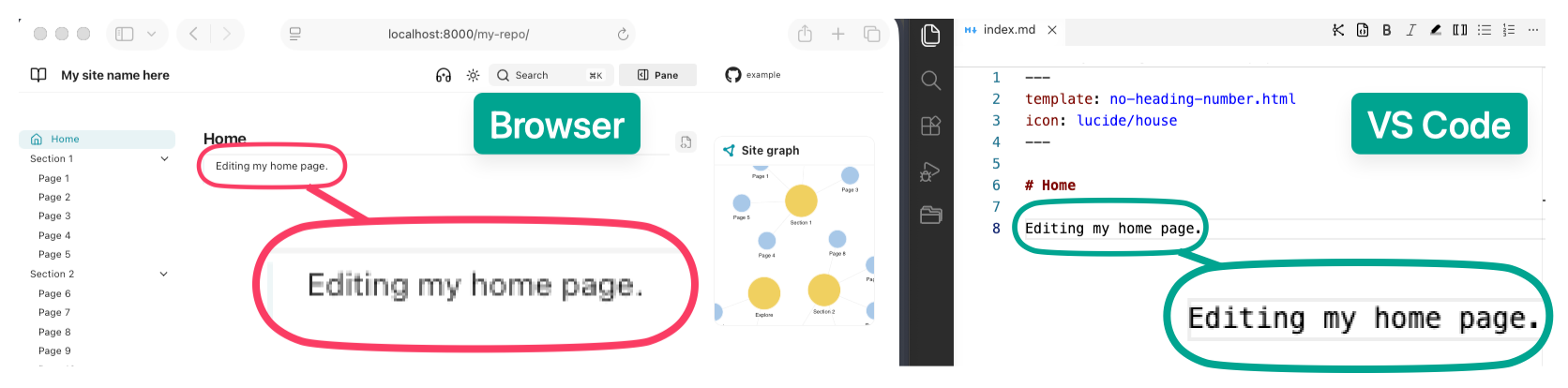
When something looks wrong
- Save the file again.
- The reload may have been missed.
- Hard refresh the browser:
- Ctrl+Shift+R
- Cmd+Shift+R
- In [[terminal]]:
- Stop
knotis serveby pressing Ctrl+C - Run
knotis build, and read any messages it prints. - Run
knotis serveagain.
- Stop
[[Upgrade]] Knotis
-
Upgrade Knotis to get the latest bug fixes, generated-page updates, and new site features.
-
Review the GitHub Releases page before upgrading.
- It lists new features, renamed settings, removed settings, and any steps needed after an update.
-
To return to an earlier Knotis version, install that version directly.
-
- Replace
0.1.0with the version to return to.
- Replace
-
-
Version compatibility
- [[Knotis]] uses a tested version of [[Zensical]].
- When new Zensical versions are released, Knotis support is added after compatibility checks.
- [[Knotis]] uses a tested version of [[Zensical]].