Search
[[Search]]
- Knotis search is a concept-aware search that replaces [[Zensical]]’s default search.
- It understands [[wikilink|wikilinks]] and plain words.
- It renders all the content items, Markdown tables, images, Mermaid diagrams, admonitions, code blocks, and videos.
- Click on the Search bar in the header, or use the keyboard shortcut:
- Ctrl+K
- Cmd+K
[[Search order]]
- Wikilink-first ranking.
- Wikilink concepts outrank non-wikilink concepts.
- The matching [[reference]] wikilinks.
- No duplicate results.
- Content-tags.
- Searching
frequency table #outputfinds#outputsections about the frequency table.
- Searching
- Ordinary text that mentions the words without using a wikilink.
[[Search view]]
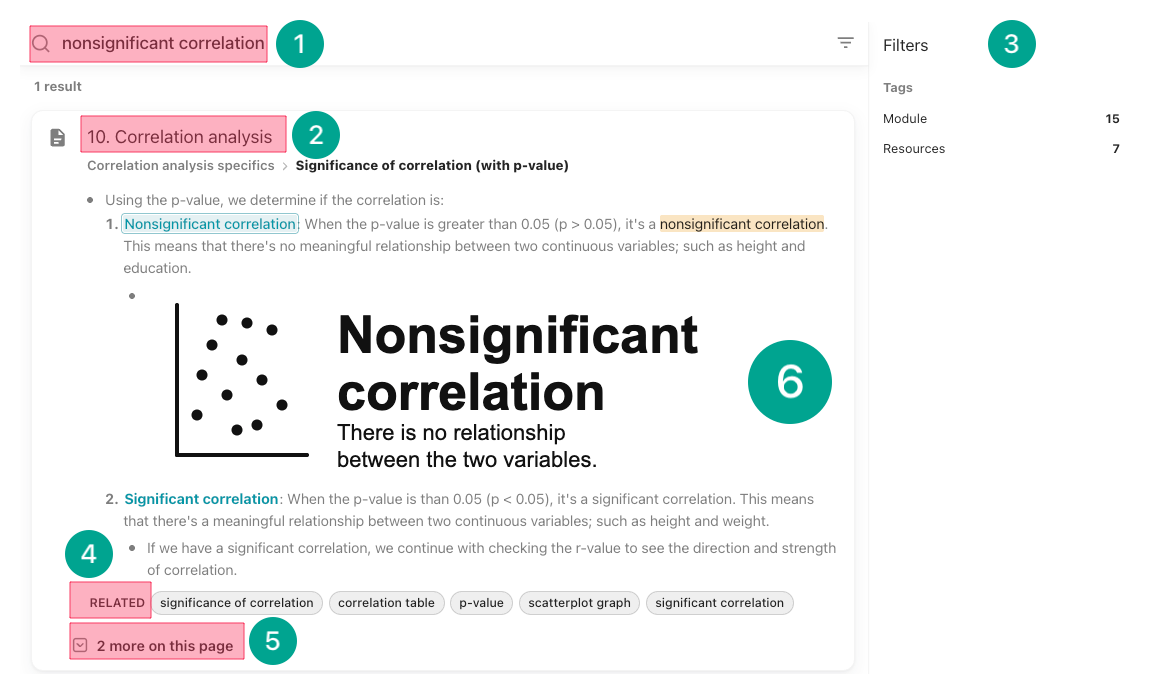
- User clicks on the Search bar in the header, or use the keyboard shortcut.
- Types the keyword/concept, such as
nonsignificant correlationto see every module that mentions it, or narrow down withcorrelation codeto find only code sections.
- Types the keyword/concept, such as
- The search cards show the module name.
- Clicking on [[page tags]] narrows the search.
- Right below each search card, there are clickable "RELATED" concepts, and
- How many times the searched keyword/concept is mentioned in the same page.
- Clicking that number expands the results within that page.
- Clicking on a search card to jump directly to that part on the page.
- User clicks on the Search bar in the header, or use the keyboard shortcut.
Search #settings
-
Search is customized in [[zensical.toml]] file.
-
- Line 2: Default is
true.falseturns the search feature off. - Line 3: Sections or pages to remove from the site graph.
- Line 4: Wikilinks to remove from the site graph.
- Line 5: sections or pages are ordered.
- Example: order = ["features", "workflows", "what-is-knotis.md"] → features pages, then workflows, then that page, then the rest.
- Line 2: Default is
-